Harbour visit
The boats came in before six. By noon, the market was empty.
- Fish on ice
- Gulls on the roof
Nobody counts the gulls.
| Tide | Time | Height |
|---|---|---|
| High water | 11:42 | 4.6 m |
| Low water | 17:58 | 0.9 m |
 Stropha
Coming soon for macOS, Windows and Linux
Go ahead, type in it. The page marks English the way Stropha does, and nothing leaves your browser.

Day or night. Stropha follows your system’s light or dark appearance, unless you choose one.
Your fonts. IBM Plex Sans by default, Plex Serif, Plex Mono or any font you have installed. Code can have one of its own.
Code in colour. Coloured by its language (off by default in Markdown files). Source code files open too, with line numbers, in about 200 languages.
Every command by name. The Command Palette runs any command by its name. In Stropha, ⇧⌘O opens Quick Search, which finds headings, lines and files.
Focus Mode keeps the sentence you are writing in full ink, and the rest steps back. Put the caret anywhere in the text below, and the focus follows it.
Add any folder to the Library. Stropha shows the Markdown files in it as they are, with favorites, smart folders and hashtags.
1 file of 6 in an example Library
Market dayTravel
Fish on ice, bread still warm, and a man selling string by the metre. The gulls watched from the roof. #travel
Proofreaders write stet beside words that must stay as they were. Stropha does the same for yours.
Write in plain Markdown. The Preview shows the page as readers will see it, beside the text or in its place.
# Harbour visit
The boats came in **before six**. By noon, the market was empty.
- Fish on ice
- Gulls on the roof
> Nobody counts the gulls.
```mermaid
flowchart LR
  Boats --> Market
  Boats -.-> Gulls
```
/Tides.csv
The boats came in before six. By noon, the market was empty.
Nobody counts the gulls.
| Tide | Time | Height |
|---|---|---|
| High water | 11:42 | 4.6 m |
| Low water | 17:58 | 0.9 m |
Put HTML in your Markdown, or open a web page. The Preview lays it out as a browser would.
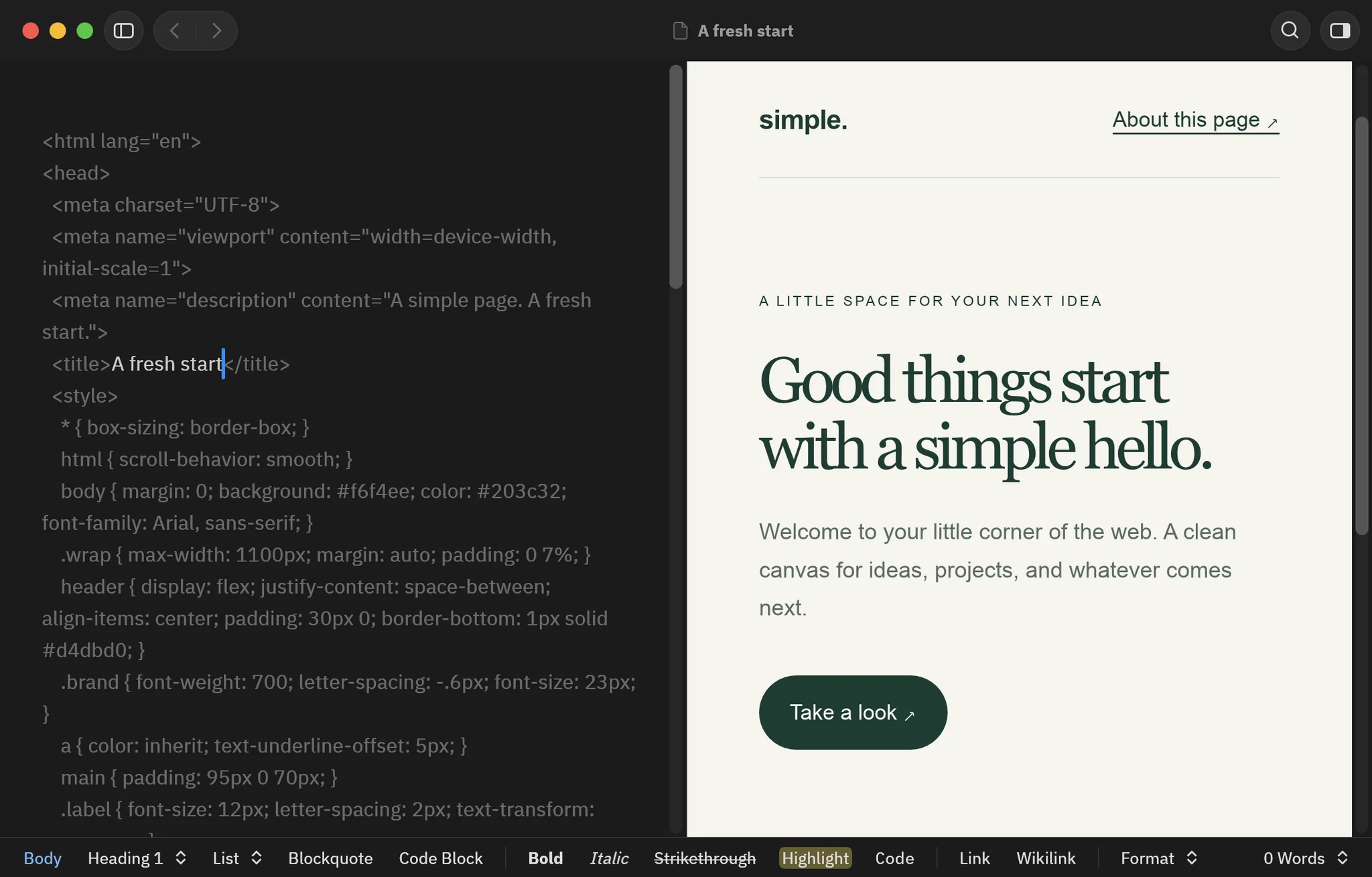
Laid out in the app, with no network. The HTML and CSS engine is written in Rust and runs inside Stropha. Pictures, style sheets and fonts come only from the file and its Library folder.
Web pages too. .html files open from the Library, which searches the words they show.
A command-line tool and an MCP server run the same engine as the app. An agent can open, read, edit and format a document, and the words it adds can be credited to AI.
$ claude mcp add stropha -- stropha-cli mcp
open_document{path: "~/Notes/Harbour visit.md"}get_text{}select{start: 120}run_command{id: "authors.pasteAs",
params: {kind: "ai", name: "Claude",
text: " The tide turned at noon."}}save_document{}Harbour visit.mdSaved
# Harbour visit
The boats came in before six. By the time the market opened, the gulls had taken the best of the catch. The tide turned at noon.
For macOS, Windows and Linux.